Agentic GitFlow
Originally Published:
Wow, agentic AI is crazy! The rate of its changes is staggering. With its help, tasks that used to take me hours or days now take me a few seconds or minutes. However, learning to use agentic AI rigorously is a skill that requires discipline, reflection, and trial and error.
A while ago, I chose to use an AI agent to help me in an unfamiliar problem space and to experiment with how far I could push that agent beyond my understanding. I gave it a few prompts. It made lots of changes. I made a few more prompts. It made more changes. The result was a lot of slop. Given my lack of understanding of the problem, I wasn't sure how much of the slop was a result of my misunderstanding and poorly written prompts or the agent's lack of training. I did know that all code, whether written by human or agent, should be:
- easy to read,
- performant,
- secure,
- testable,
- idiomatic
- ...
That's when I realized that I needed to take more control of the flow of changes. I needed to press into all of the changes to make sure that I understood. I needed to prompt it to refactor the code to make it more legible and to follow good engineering practices. If subsequent prompts and changes did not add clarity, then I needed a way to easily set those changes aside or throw them away forever.
The pull-request and reset-rebase flows from my post on gitflows are great when I'm making the changes that I want to share with my team, but what about when there was an agent wreaking havoc on my repo? I didn't want to push changes from the agent that weren't fully vetted. I wanted to use an agent to accelerate my rigor and my understanding, not produce slop.
So, I came up with this custom flow specifically to work with agents:
- Prompt for changes.
- Reject changes I do not approve of.
- Create a checkpoint commit as I have verified progress was made.
- Prompt for a refactor.
- Iterate until the solution is correct.
- Reset the checkpoint commits with the final changes still outstanding.
- Create an official commit.
- Follow one of the gitflows accordingly.
This flow modifies the reset-rebase flow from gitflows by adding a specific checkpoint message, "ai-pair-coding-checkpoint". The flow helps me to steer the agent to produce a correct solution. I can also more freely change my mind on requirements or unravel my mistaken prompts by throwing away changes with git reset --hard $last_good_commit.
To improve my efficiency, I added this check script to my $PATH:
#!/bin/bash

help=$(cat <<EOF
Usage: check {point|reset}

point: Create a checkpoint by committing with a specific message.
reset: Reset to the commit before the first checkpoint.
EOF
)

# Create a checkpoint message.
checkpoint_msg="ai-pair-coding-checkpoint"

case "$1" in
    point)
        # Create a checkpoint by committing with a specific message.
        git add -A
        git commit -m "$checkpoint_msg"
        ;;
    reset)
        # Find the first checkpoint commit
        first_checkpoint=$(git log --oneline --grep="$checkpoint_msg" | tail -1 | awk '{print $1}')
        if [ -z "$first_checkpoint" ]; then
            echo "No checkpoint found."
            return 1
        fi

        # Get the target commit hash (the one before the checkpoint)
        target_commit=$(git rev-parse "$first_checkpoint^")

        if [ -z "$target_commit" ]; then
            echo "No commit found before the checkpoint."
            return 1
        fi

        echo "Resetting to commit before first checkpoint: $target_commit"
        git reset --soft "$target_commit"
        ;;
    *)
        echo "$help"
        ;;
esac
Example Agent Check Flow
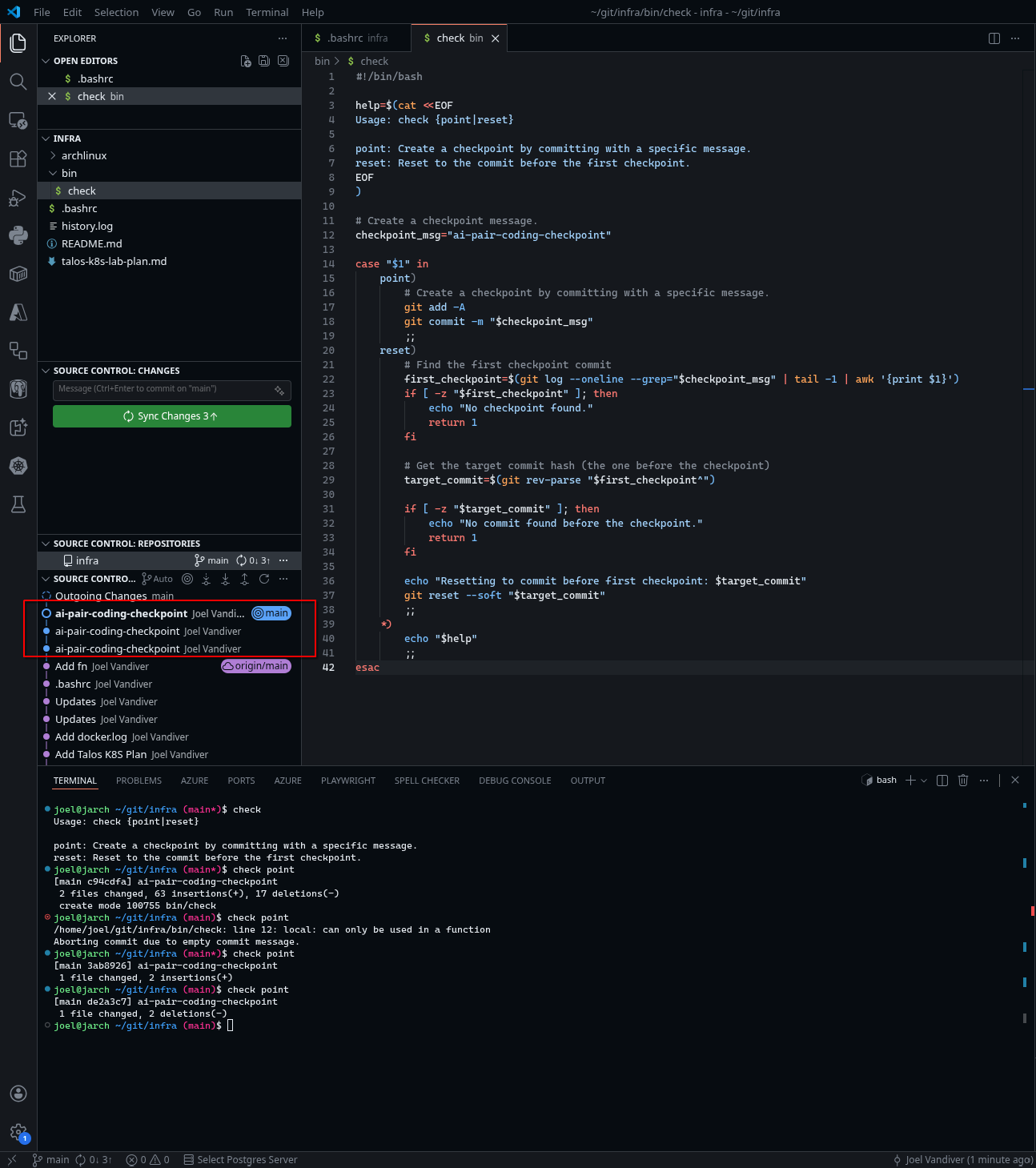
As the agent makes progress I run several check point commands. You can see the multiple ai-pair-coding-checkpoint commits in the screenshot.
Then, once I'm satisfied with the final changes, I run check reset. The screenshot shows commits have been reset and the final changes left in the queue.
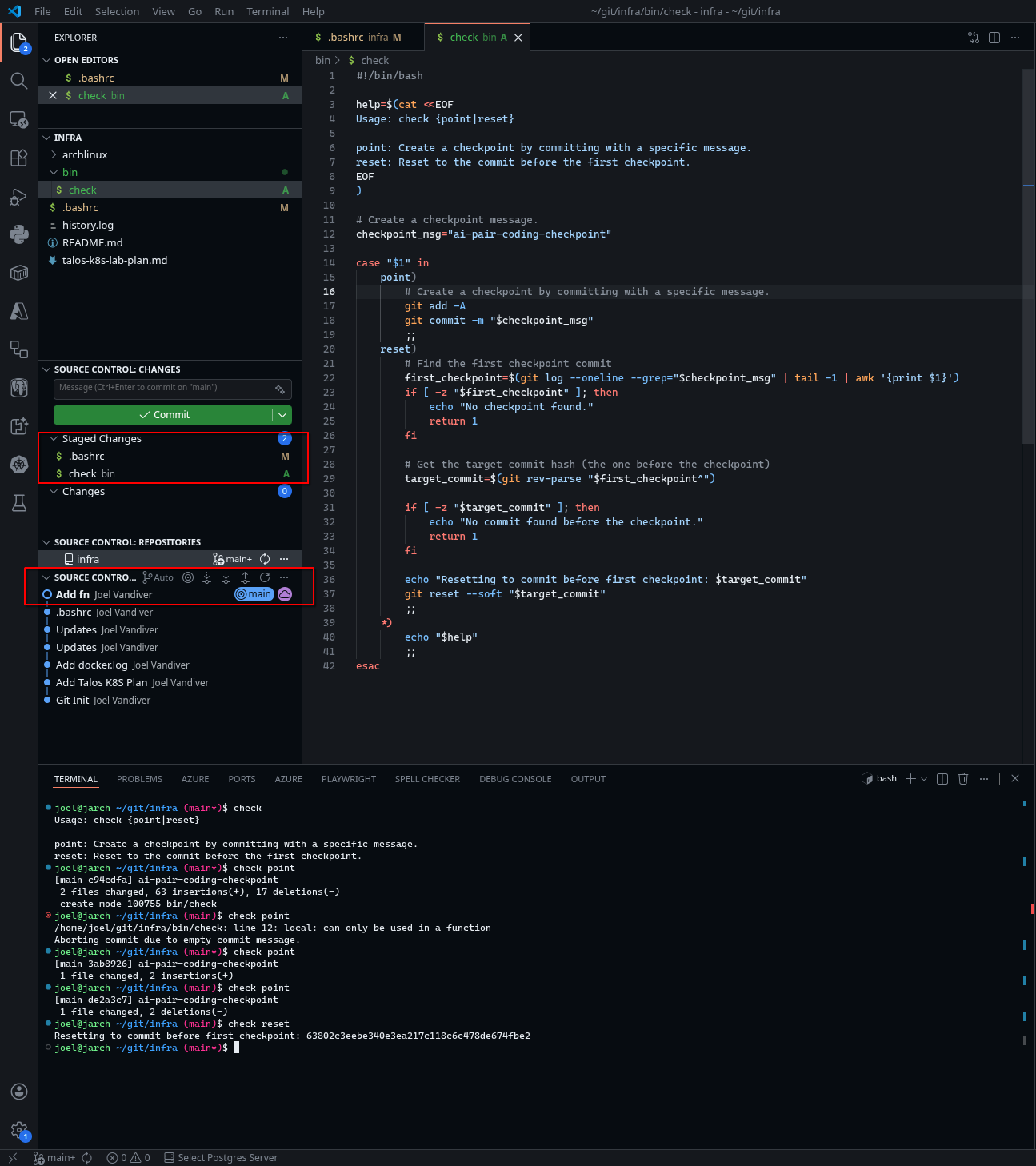
Now, I'm free to create the final commit with the verified changes.
Watch Out!
If you add other commits after a check point without a check reset, the script above will reset to the first ai-pair-coding-checkpoint it finds.
If you pushed the commits to the remote, then you will need to do some cleanup:
# Find the commit you want to reset
# even though you reset to before it.
git log --all

# Reset to that commit
git reset --soft $commit_hash

# Find the ai-pair-coding-checkpoint commit hash
# to reword.
git log

# Rebase that commit interactively.
# Change "pick" to "reword" and save.
git rebase -i $commit_hash

# Force push to the remote, only if
#   you have permission to force push!
git push -f